Midterms Are Ready
Midterm season is almost here. Each of our three cybersecurity courses includes a ready-to-assign midterm in its supplemental modules.
How to assign the midterm:
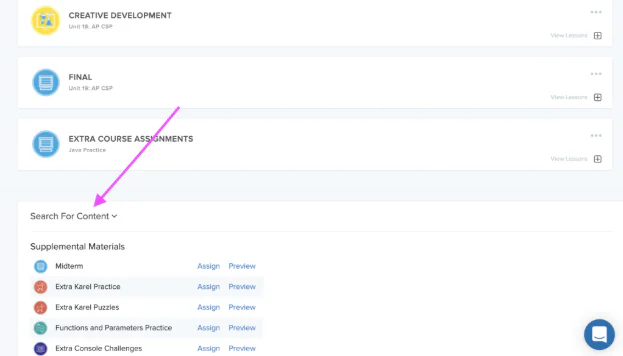
Go to the Assignments app and use the Course dropdown to choose your course.
Scroll to the bottom of the page and click Search for Content.
Under Supplemental Materials, click Assign next to Midterm to add it to your section.
Holiday Activity: Spot the Shopping Scam
Holiday shopping season is prime time for scammers. Fake deals, fake delivery texts, and gift card requests all show up more often between Black Friday and New Year's.
Classroom Activity: Real Deal or Scam?
Present these scenarios to students and have them identify the warning signs:
Discussion Questions
How could you check whether a delivery text is real without clicking its link?
Why do scammers prefer gift cards and payment apps over credit cards?
Cybersecurity in the News
One Stolen Login Exposes Millions of California Students' Records
In October, the California Department of Education announced that a hacker used a compromised login to break into a file transfer site run by Educational Testing Service (ETS), the nonprofit that runs the state's standardized tests. Between May and September 2026, the attacker copied names, birth dates, home addresses, student ID numbers, and demographic details, including disability status, for millions of current and former students. Social Security numbers and financial information were not taken.
The intrusion went unnoticed for about four months. It's a reminder that student data often lives with outside vendors, and one weak login can open the door. Affected students are being offered two years of free identity protection.
Class Discussion Questions
The attacker logged in with a real, stolen password. What security controls could have stopped them or caught them sooner?
Families may now get scam emails pretending to be about this breach. What might one look like, and how would you spot it?
Schools share student data with testing companies, apps, and other vendors. Should students and families have a say in who holds their data? Why or why not?
Cybersecurity Challenge
Can you decode the message below?
Hint: The keyword is GIFT.
Last Insider's Challenge Answer
Can you decode the message below? Every letter has been swapped for a different one. Nothing has changed position.
MVEVI IVFHV KZHHDLIWH
This is an Atbash cipher. It reverses the alphabet, so A becomes Z, B becomes Y, C becomes X, and so on. Since the mapping works both ways, the same step encodes and decodes.
The message reads: “NEVER REUSE PASSWORDS”
Request a Visit from CodeHS for CSEdWeek
From November 30th – December 11th, CodeHS team members are visiting classrooms to celebrate Computer Science Education Week! Request a visit from the team or explore Hour of Code and Hour of AI activities you can assign to students during CSEdWeek. We're also hosting CSEdWeek webinars for teachers. RSVP for a webinar to save your spot.
Stay Connected
Chat with fellow teachers in the CodeHS Educators Facebook Group
Happy Coding!
- The CodeHS Team
Interested in learning more about CodeHS Pro?Request a quote.